Folders & collections
Nest requests in folders like QA / Users. Drag to reorder, duplicate, move, and run a whole folder at once.
pyhttp is a Postman-like HTTP client with a built-in collection runner, in its own desktop window. Requests live in a SQLite file, every run writes to plain files, and the backend only listens on 127.0.0.1.
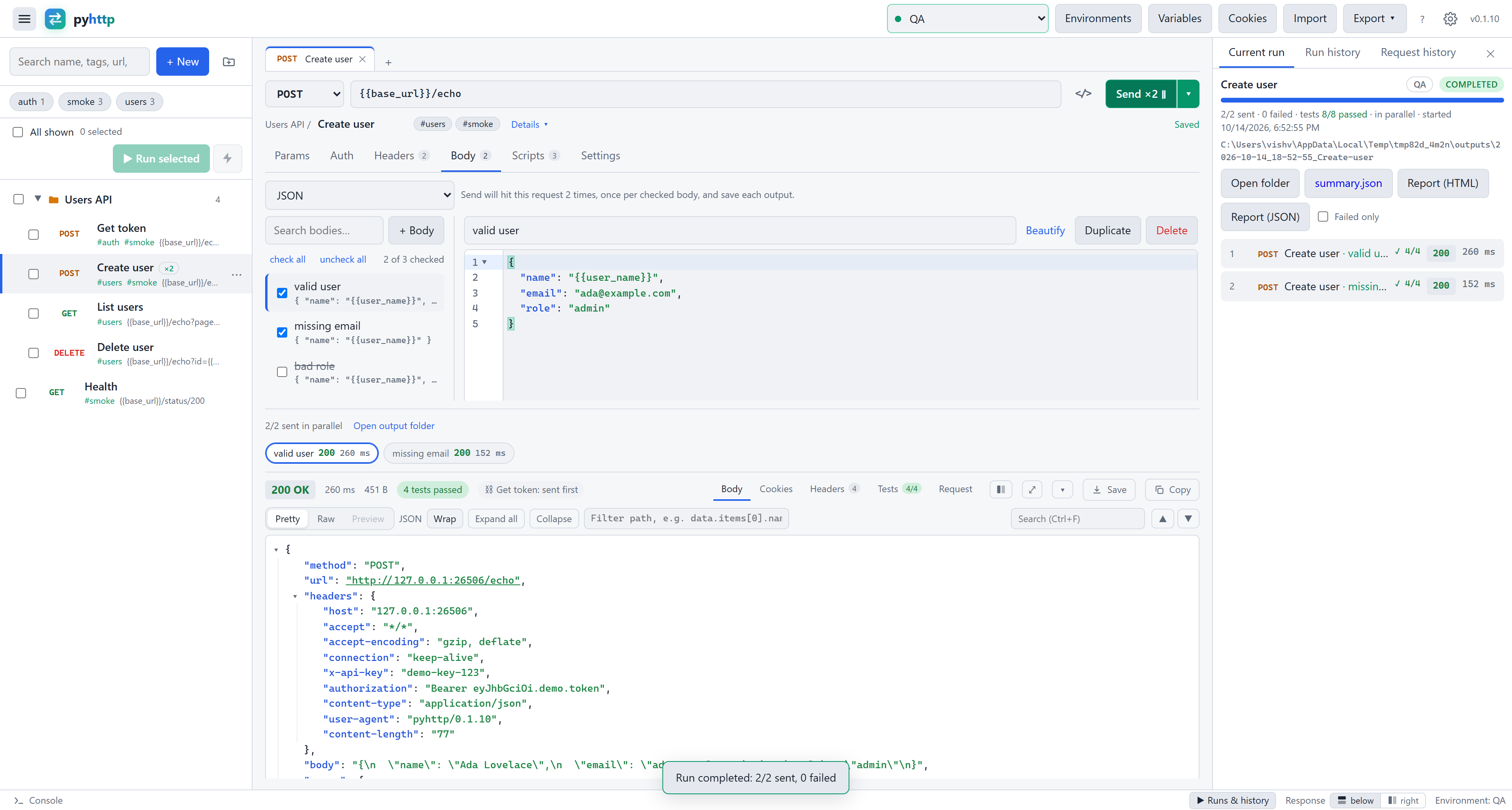
Build, organise, run and test requests with the tools you already know.
Nest requests in folders like QA / Users. Drag to reorder, duplicate, move, and run a whole folder at once.
Dev, QA, Staging and Prod, each with its own {{base_url}}. Prod is flagged red so you never hit it by accident.
Mark a key or password secret and it's masked on screen and saved as •••••• in history and run files.
OAuth 2.0 tokens are fetched, cached and refreshed for you. Also Basic, Bearer, API key and Digest, inherited from folders.
Postman collections and environments, OpenAPI 3 / Swagger 2 in JSON or YAML, browser HAR files, or a pasted curl.
Every request you send is kept. Filter by status, send again with one click, or diff two responses side by side.
Keep valid user, missing email and more on one request. Tick the ones to send, every response shows as its own chip, and tests and scripts can target one body or all of them.
CodeMirror with folding and bracket matching. Ctrl+/ comments a line, Ctrl+B beautifies, and broken JSON is pointed out live.
A collapsible JSON tree. Click a key to copy its path, filter with data.items[*].id, or preview HTML, images and PDF.
{{$guid}}, {{$timestamp}}, {{$randomEmail}} and path params like /users/:id. Unresolved ones are flagged before you send.
Cookies are stored per domain like a browser, sent automatically, and editable in a manager.
Request and response are two panes that scroll on their own, so the URL and the status never leave view. Put the response below or to the right, drag the divider, hide the sidebar with Ctrl+\.
pyhttp checks for new releases at start. The Windows installer, the portable .exe and the Homebrew install download, verify and install the update, then restart.
A per-user Windows installer with no admin rights, a portable .exe, a Homebrew cask or .dmg on macOS, and a .deb for Ubuntu 22.04+ and Debian 12+.
Point a request at the one that fetches its token. The token request runs first, is reused until the expiry you set, and is refreshed with one retry when the API answers 401.
Send fifteen bodies or a whole run at once, bounded by a limit you choose, or keep them in order when one request feeds the next. Pick the mode right on the Send button.
While a run goes, every request it sends shows its responses next to it: one chip per body and iteration, so you compare them without opening the report.
Drive iterations from a CSV or JSON file of variable values, one row per iteration. The run dialog writes a sample with a column for every variable your requests use.
Use it at home or at any company, for any purpose, with no fees, no seats and no registration. The app stays free; paid extras, if ever, are optional add-ons.
Select requests, reorder them and run them with live progress. Each response lands in the run's output folder, so you always have a record of exactly what happened.
{{prev.json.token}} or {{prev.status}}.{{prev}}, or everything at once with a limit you set.Real screenshots of pyhttp 0.1.10, taken against a local test API.
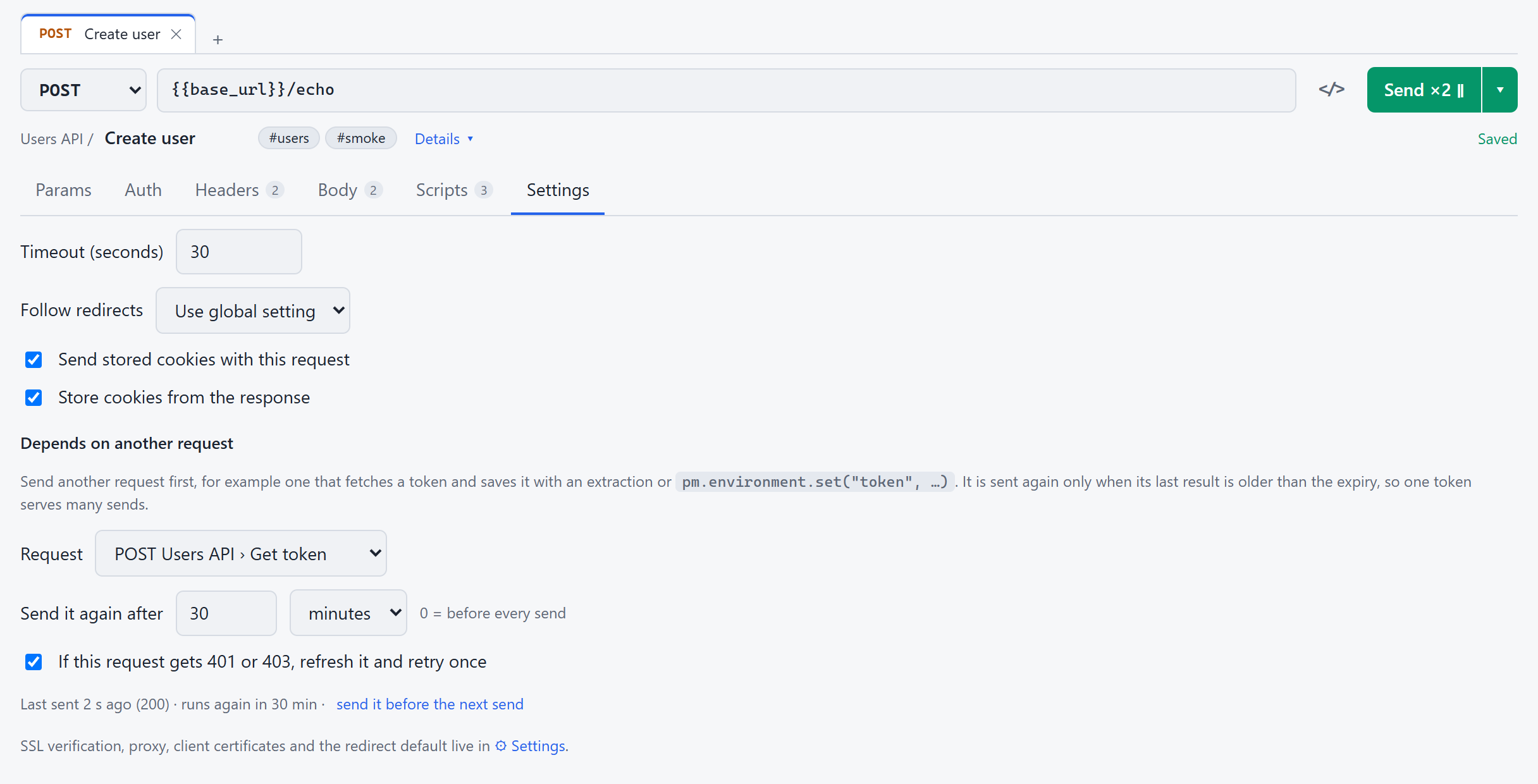
Pick the request that fetches your token and how long it stays valid. It runs first, its extraction sets {{token}}, and it is reused until it expires. A 401 refreshes it and retries once.
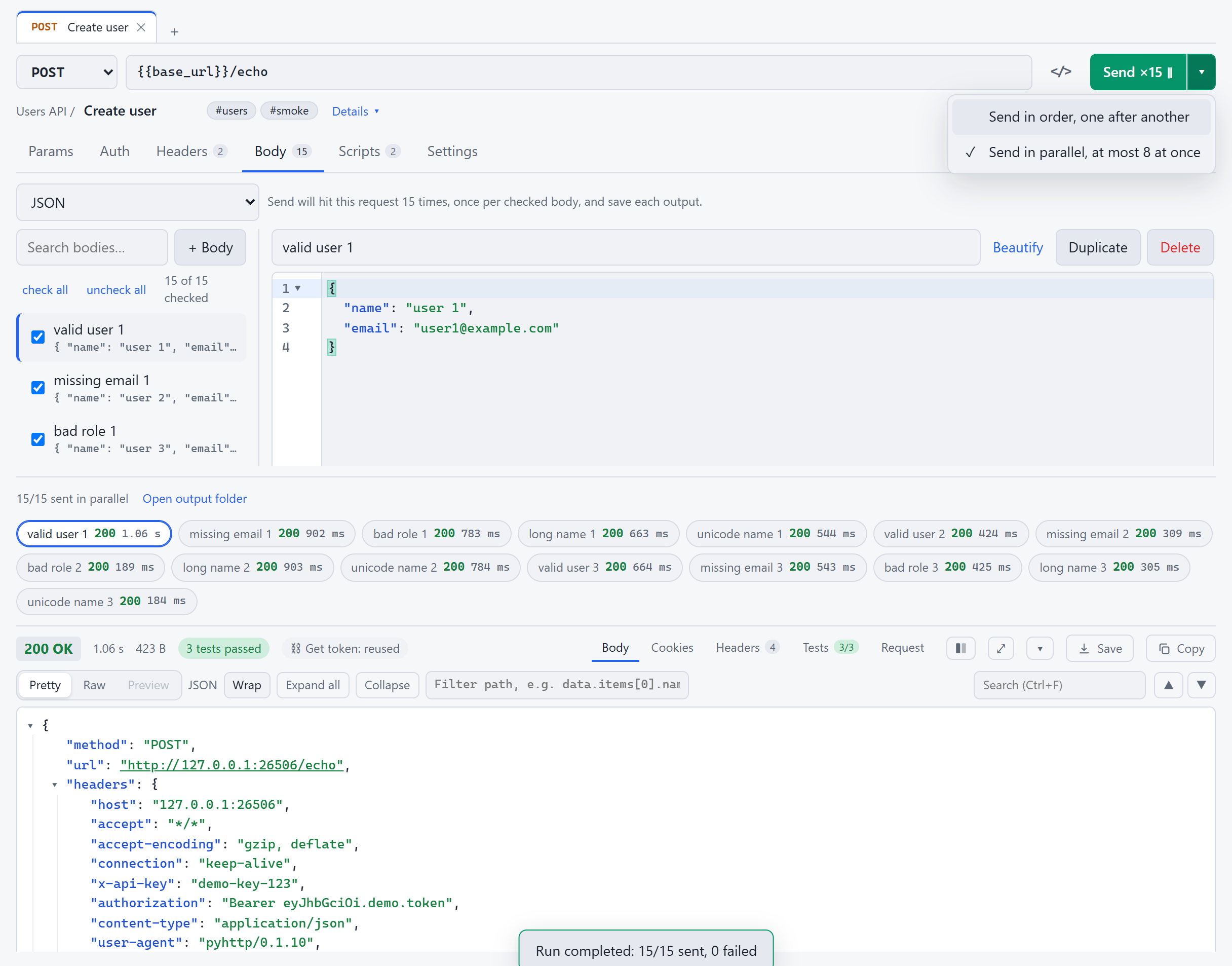
Send ×15 goes out at once, at most eight at a time, with the token fetched only once. Every response is a chip with its status and time; click one to read it. The ▾ next to Send switches between in order and in parallel.
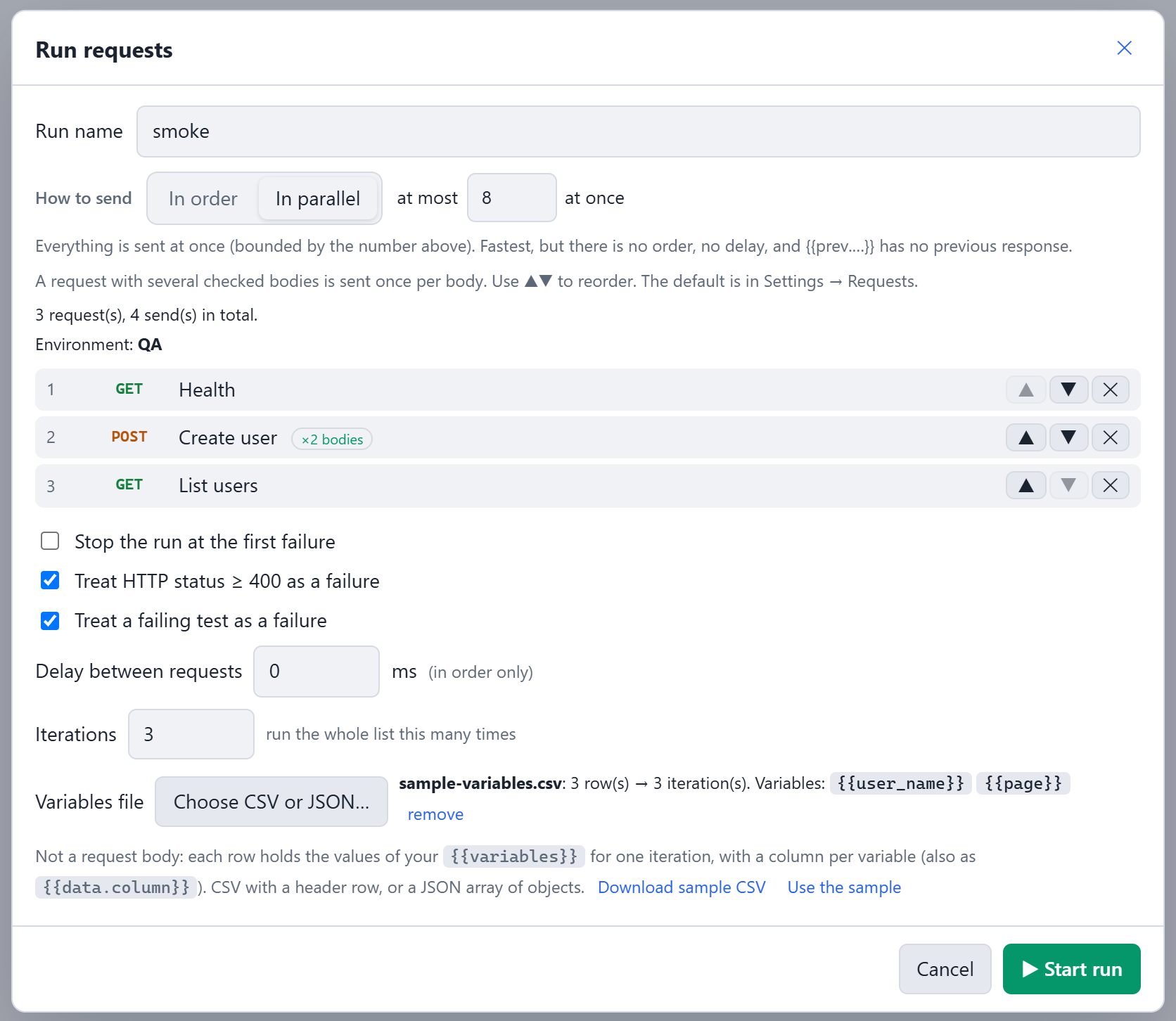
Choose how to send, then load a CSV or JSON of variable values, or let pyhttp write a sample from the variables your requests use. Three rows, three iterations.
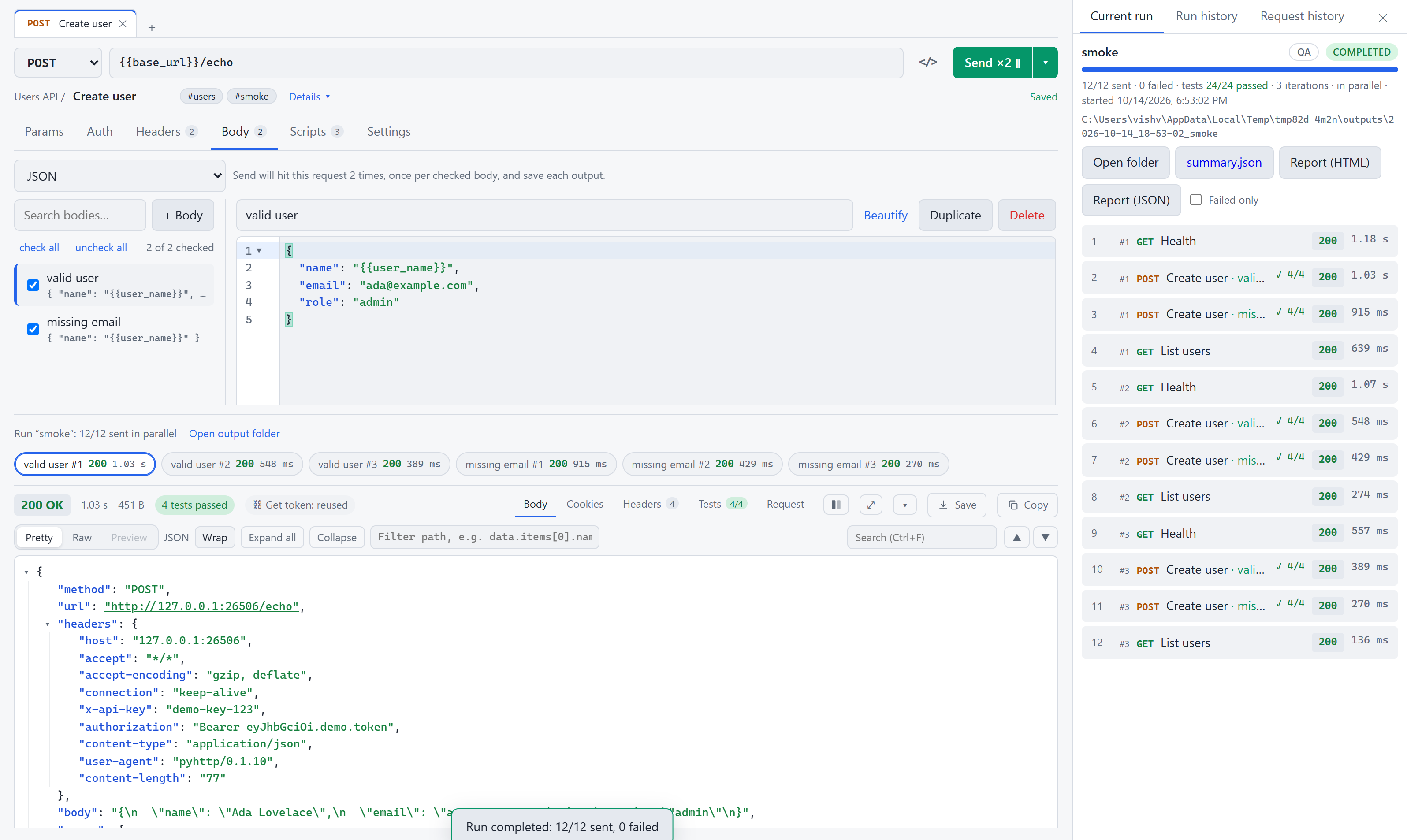
Open any request after a run and its responses are right there: one chip per body and iteration, with the run's name and totals above them, next to the full run report.
pyhttp run runs folders, requests or a collection file without the window, prints each result and exits non-zero when anything fails. It works like newman, but for pyhttp.
--tag smoke, or a Postman, OpenAPI or HAR file.--env QA, an exported environment file, or --var key=value.0 all passed, 1 something failed, 2 usage error.The Scripts tab has a Pre-request and a Post-response section, like Postman's. Build checks on status, headers, body, JSON path and response time from simple rows; results show in the response's Tests tab and in run reports.
{{token}} next.pm API in JavaScript.py object for anything the builder can't express.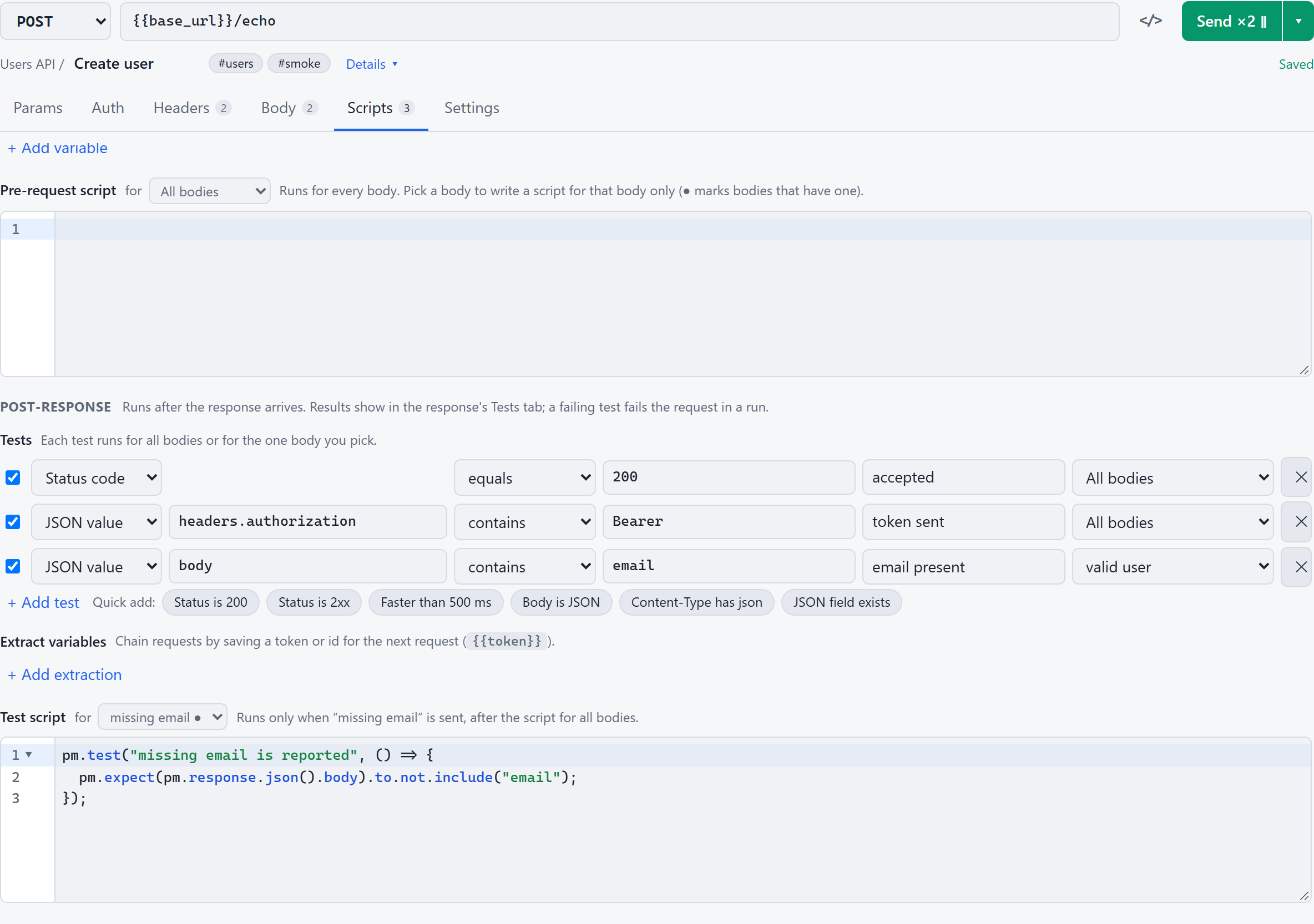
Request history sits next to Run history in the right-hand panel. Pick any two entries and pyhttp diffs the status, timing, headers and body. JSON keys are sorted first, so only real changes show.
No account to create, nothing synced to a cloud, no telemetry.
The backend listens only on localhost. Window mode picks a free port and prints it on start.
Requests, folders, environments and history live in one SQLite file. Move it with --data-dir.
A native OS webview (WebView2, WKWebView or WebKitGTK) with native file dialogs. Python 3.10+ is all you need.
Use pyhttp run in CI, or start with --server for a REST API documented at /api/docs.
Every common action has a shortcut. On macOS, use Cmd in place of Ctrl.
Packaged builds bundle Python and every dependency. Just double-click.
Installer: per user, no admin rights, updates itself. Or the portable .exe, one file, no install. WebView2 ships with Windows.
Apple Silicon .dmg. Drag pyhttp to Applications, or brew tap pyhttp2/pyhttp https://github.com/pyhttp2/pyhttp-releases && brew install --cask pyhttp2/pyhttp/pyhttp (then updates install themselves).
Ubuntu 22.04+ / Debian 12+ .deb: sudo apt install ./pyhttp-*.deb. Uses your distro's GTK and WebKitGTK. Other distros run from source.
The builds aren't code-signed yet, so the first launch shows a warning you can allow once (see the FAQ). pyhttp checks for new versions at start; on Windows and with Homebrew it installs them itself. Previous versions and checksums (SHA256SUMS.txt) are on the releases page.
Yes, for everyone. pyhttp is free under the pyhttp Free License: use it at home or at work, at a company of any size, for any purpose, with no fees, no seats and no registration. You can share the unmodified installers inside your company or through package managers. The source code is not published. The app stays free; if paid extras ever appear they will be optional add-ons. pyhttp is provided “as is”, with no warranty of any kind and no liability for any damage or loss from its use; see the license for the full terms.
No. There's no sign-up, no sync and no telemetry. Your collection is a SQLite file on your disk, and the only network traffic is the requests you send. The app checks GitHub for a newer release, and that's all.
Yes. Import Postman v2.1 collections and environments, including folders, auth, variables and scripts. pm.* scripts run unchanged. You can also export back to Postman format.
Yes, OpenAPI 3 and Swagger 2 in JSON or YAML. Each tag becomes a folder, the server URL becomes {{baseUrl}}, and request bodies are filled from the spec's examples and schemas. HAR files from browser devtools work too.
No. Save the request that fetches the token and let it store the value with an extraction or pm.environment.set. In any other request's Settings tab, pick it under Depends on another request and set how long a token stays valid. pyhttp sends it first, reuses the token until then, fetches it only once even for parallel sends, and refreshes it with one retry when the API answers 401 or 403.
Run python -m pyhttp run with a folder name or an exported collection file. Add --junit out/junit.xml for your CI's test report. The exit code is 1 when any request or test fails.
pyhttp looks up the latest release at start (and on Check now in Settings) and shows an Update button when a newer version exists. The Windows installer, the portable .exe and a Homebrew install download the new version, verify its checksum and install it, then pyhttp restarts. A .dmg or .deb install gets the download and the exact command to run. Your requests and settings are never touched.
The .deb installs on Ubuntu 22.04 and later and Debian 12 and later, and uses the distribution's GTK and WebKitGTK packages (they are pulled in as dependencies). Other distributions can run pyhttp from source with Python 3.10+ and the GTK webview bindings.
The builds aren't code-signed yet, so the system warns on first launch. On Windows (installer or portable), click More info → Run anyway. On macOS, right-click pyhttp in Applications and choose Open, or allow it in System Settings → Privacy & Security. If macOS says the app is damaged, run xattr -dr com.apple.quarantine /Applications/pyhttp.app.
The .dmg is built for Apple Silicon. On an Intel Mac, run pyhttp from source with Python 3.10+.
In %APPDATA%\pyhttp on Windows, ~/Library/Application Support/pyhttp on macOS and ~/.local/share/pyhttp on Linux. Use --data-dir to keep it somewhere else, such as a synced folder. Updates and uninstalls leave it alone.
Free for everyone, at home or at any company. No sign-up, ever.